

Aqara M200 and the Aqara Hub M3 are two of the best smart home hubs you can buy, but they’re aimed at very different buyers. The M200 is a simple option if you want reliable Matter and Thread support without paying for features you’ll never use. The M3 adds more device capacity, local processing and backup features for bigger setups. Which you should buy depends on how big your setup is and how much you expect it to grow. We’ve tested both, and here’s how they compare.
Design
- The Hub M3 supports Power over Ethernet, while the M200 ships with a standard power plug.
- The M3 includes a built-in 95dB speaker for alerts; the M200 has no speaker at all.
- The M200 uses a round form factor with a ¼-inch mounting thread; the M3 is a 105x105mm square that ships with a wall bracket.
The Aqara Hub M3 is the better-designed of the pair. Its square black body looks at home in a modern living room, and the practical extras back that up. PoE support means you can run a single Ethernet cable, and a 95dB speaker is useful for security alerts. It also comes with a handy wall mount.
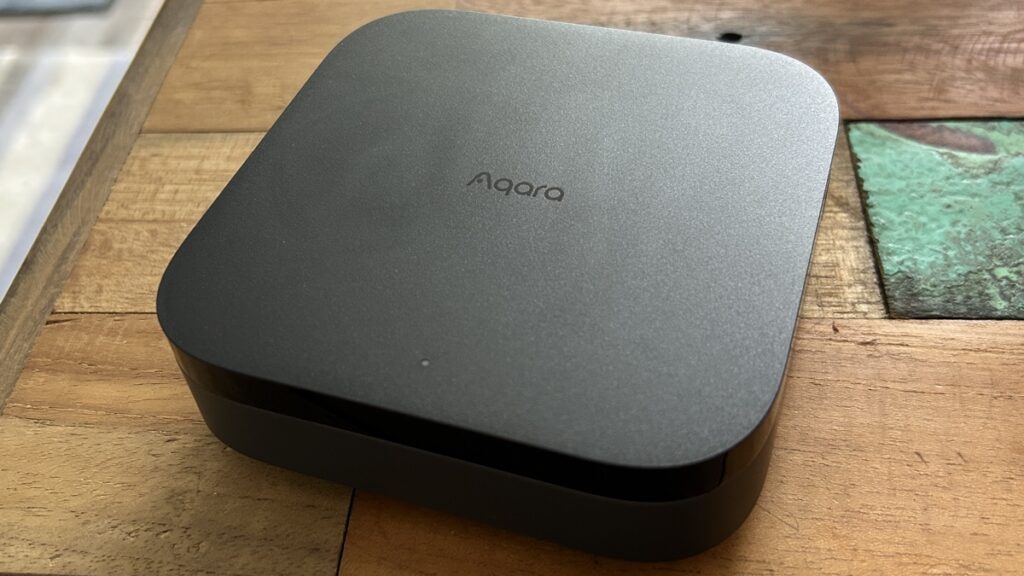
The M200 isn’t ugly, with a compact round shape that’s tidy and stays out of the way, and its ¼-inch thread gives you a mounting option, but it’s not as convenient as the bracket the M3 ships with. It’s powered by USB-C, although PoE is an optional extra.

Winner: Aqara Hub M3
Setup
- The Hub M3 supports both 2.4GHz and 5GHz Wi-Fi, while the M200 is 2.4GHz only.
- The Hub M3 includes a migration tool that pulls over existing Aqara devices, names, automations, and rules in seconds.
- The M200 supports PoE, giving it a wiring flexibility option the Hub M3 does not mention.
Both hubs connect over Ethernet or Wi-Fi, and pairing through the Aqara app is easy on either one, but the Hub M3 goes further. You get 5GHz Wi-Fi support, a Bluetooth fallback for when the app can’t auto-detect the hub, and a migration tool that’s useful if you’re coming from an older Aqara hub like the M1S or M2. It moves your child devices, names, automations and rules across in seconds.

The M200 keeps things simpler and throws in PoE support, which is handy for tidier installs. You don’t get the M3’s migration tool or Bluetooth fallback, though.

Winner: Aqara Hub M3
Performance
- The M3 supports 127 Zigbee and 127 Thread devices versus the M200’s cap of 40 each.
- The M3 packs 128GB of local storage for full edge computing, while the M200 has just 8GB for basic local automations only.
- The M3 adds ARK Mode 2 redundancy and Device Binding so automations survive hub failures; the M200 has no such fallback.
Both hubs speak Zigbee and Thread, so the device compatibility list is identical. The similarities stop there. The Aqara Hub M3 is an edge computing box, running every automation and device setting locally from 128GB of onboard storage. If your internet drops, everything keeps working. Pair two M3s and you get automatic failover via ARK Mode 2, and even when the hub itself dies, some devices keep working thanks to Device Binding.
With just 8GB of storage, the M200 can manage only basic local automations. That’s been good enough for jobs like underfloor heating control or shutting off a water valve when a leak sensor trips, and it’s proven reliable at that. But it can’t match the M3’s local processing, and it has no backup if the hub fails.
Winner: Aqara Hub M3
Matter support
- The M200 works as a Matter bridge, exporting Aqara Zigbee devices into third-party systems like Apple Home.
- The Hub M3 launched with Matter support limited to just three brands: Philips Hue, Nest, and Leviton.
- The M3 has since expanded Matter device support but Aqara warns interoperability issues may still arise.
The Aqara M200 takes a sensible approach to Matter: it works as a bridge, pushing your existing Aqara Zigbee gear out to platforms like Apple Home and Homey. Keeping devices on Zigbee through the hub holds onto extra features you’d otherwise lose. Adding Matter devices to it didn’t always work in my testing, but it does its main job as a bridge well.

Matter support on the Hub M3 is weaker. At launch it was limited to three brands, an odd restriction for a standard that’s meant to be brand-agnostic. Wider support has rolled out since, but Aqara itself warns about possible interoperability problems, and the M3 still lags behind dedicated multi-protocol hubs.

Winner: Tie
Value
- The M200 costs significantly less than the M3’s $129.99 / £129.99 launch price.
- Both hubs have nearly identical features, with edge processing the only notable M3 advantage.
- The M3 is an early-adopter purchase, while the M200 is proven.
On a budget, the Aqara M200 wins easily. It gives you much the same features as the M3 for a lot less money, and the only real sacrifice, edge processing, is something the M3 can’t actually put to use yet given where its Matter support sits today. The M3 runs $129.99 in the US and £129.99 in the UK. It’s the best Aqara hub you can buy, but you’re paying extra to future-proof rather than for anything you’ll use today. If you just want your Aqara gear to work without spending more than you need to, the M200 is the better buy.
Winner: Aqara M200
Specs comparison
| Spec | Aqara M200 | Aqara Hub M3 |
|---|---|---|
| Price (UK) | Not stated | £129.99 |
| Price (US) | Not stated | $129.99 |
| Zigbee devices supported | 40 | 127 |
| Thread devices supported | 40 | 127 |
| Onboard storage | 8GB | 8GB (on-board); 128GB total |
| Ethernet (RJ45) | Yes | Yes |
| Wi-Fi | Yes (2.4GHz) | Yes (2.4GHz and 5GHz) |
| Power over Ethernet (PoE) | Yes | Yes |
| Zigbee support | Yes | Yes |
| Thread support | Yes | Yes |
| Matter support | Yes | Yes |
| Edge processing | No | Yes |
Final thoughts
If you want a simple hub that doesn’t cost much, the Aqara M200 is your pick. It handles Zigbee and Thread devices just as capably as the M3, bridges your existing gear to Matter reliably, and costs noticeably less. For a modest smart home, or if you’re new to Aqara, it’s the one to buy.
If you’re after the best hub Aqara makes right now, it’s the M3. It outperformed the M200 in our testing, looks better on a shelf and is easier to set up. You’ll pay more, but if you have a lot of devices or expect your setup to grow, the M3 is worth the extra.
The Aqara Hub M3 is the right choice here. It runs every automation and device logic locally on the hub itself, so your routines keep working even if your internet connection goes down. The M200 does not offer this edge processing capability.
Yes, the M200 handles this job well. It acts as a Matter bridge, pushing your existing Aqara Zigbee devices out to platforms like Apple Home and Homey without any fuss. If that bridging function is your main goal, the M200 covers it at a lower price.
The Aqara M200 wins on value. It delivers most of the same features as the M3 for significantly less money, and the main thing you give up is local edge processing, which many users will never notice on a reliable home internet connection.
The Aqara Hub M3 is the stronger pick for a visible, permanent installation. Its glossy matte black square body looks more at home in a modern living room, and practical additions like PoE support make it easier to place neatly without relying on a nearby power outlet.
Yes, the Hub M3 supports 5GHz Wi-Fi, while the M200 does not. It also includes a Bluetooth fallback option during setup, which makes the initial connection process more reliable. For most users this is a convenience rather than a necessity, but it gives the M3 more flexibility in homes with crowded 2.4GHz networks.